
In the top right-hand corner of the User Portal, you can access your applications, including the Attendant Console, Softphone, and Video Conferencing, by clicking on the Apps dropdown menu as shown below.
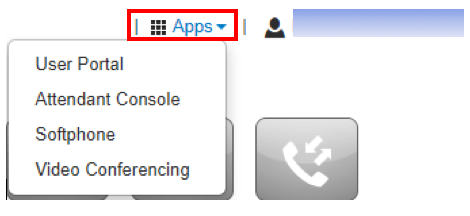
- User Portal is the web interface that enables you to manage your account. It provides an at-a-glance view of everything going on with your extension. Click on this to return to your home page.
- Attendant Console allows you to park a call with Dynamic or Static Call Parking. Call Park enables you to put a call into a parking orbit so that another user can retrieve the call when available. Dynamic Call Park will place the caller in the first available parking spot. Static Parking will allow you to park the call on a specific extension.
- Softphone allows you to make telephone calls over the Internet via your computer or laptop. The Softphone app lets you view and edit contacts, make calls, chat, hear voicemails, view answering rules and record greetings.
- If your company subscribes to videoconferencing, you can join and schedule video conferences and set up meeting rooms.