Smart City Support
  1. Home
  2. Business - Internet and Phone
  3. Business - Hosted Voice and Phones
  4. Office Administrator
  5. Managing Users
  6. Configuring the User Profile
Searching...

Configuring the User Profile

To configure the profile for the selected user, complete the fields in the Profile tab as defined in the following table, Configuring the User Profile, and then click Save.
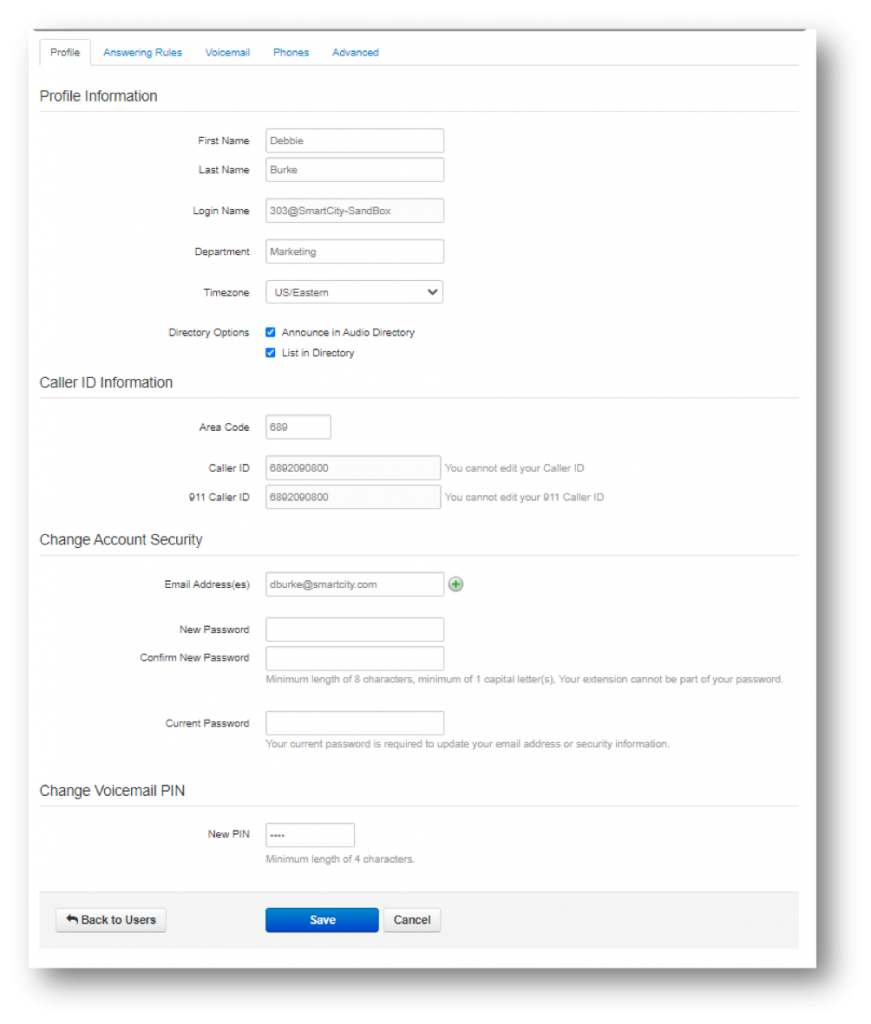
Configuring the User Profile Settings


Updated on August 15, 2024
Tagged: new User ProfileUser Profile

Related Articles

  • Call Forward Selections Settings
  • Configurable User Table Columns
  • Bulk Edit Users
  • Deleting Users
  • Editing Individual Users
  • Deleting Answering Rules

Popular Articles

  • Recent Call History Panel
  • How do I create an account on MyAccount?
  • Phone Calling Feature Pricing
  • Which speed test server should you use?
  • How do I change my account information?
© Copyright Smart City
  • Terms of Use
  • Privacy Policy